25 Kasım 2015 Çarşamba

WCF SecurityNegotiationException Hatası


"Unhandled Exception: System.ServiceModel.Security.SecurityNegotiationException: Secure channel cannot be opened because security negotiation with the remote endpoint has failed. This may be due to absent or incorrectly specified EndpointIdentity in the EndpointAddress used to create the channel. Please verify the EndpointIdentity specified or implied by the EndpointAddress correctly identifies the remote endpoint. ---> System.ServiceModel.FaultException: The message with Action 'http://schemas.xmlsoap.org/ws/2005/02/trust/RST/Issue' cannot be processed at the receiver, due to a ContractFilter mismatch at the EndpointDispatcher. This may be because of either a contract mismatch (mismatched Actions between sender and receiver) or a binding/security mismatch between the sender and the receiver. Check that sender and receiver have the same contract and the same binding (including security requirements, e.g. Message, Transport, None)."

Hatasını aldığınızda Enpoint adresinde bazı security, mesaj ve Transport ayarlarından dolayı hata almaktasınız.Bu servisin yapısına göre değişkenlik gösterebilir.

Bir windows web servis için yaptığımız configurasyon örneği aşağıdaki gibidir

System.ServiceModel.WSHttpBinding binding = new System.ServiceModel.WSHttpBinding();


binding.MaxReceivedMessageSize = 2147483647;
binding.CloseTimeout = TimeSpan.MaxValue;
binding.OpenTimeout = TimeSpan.MaxValue;
binding.ReceiveTimeout = TimeSpan.MaxValue;
binding.SendTimeout = TimeSpan.MaxValue;

WSHttpSecurity _wsHttpSecurity = new WSHttpSecurity();
_wsHttpSecurity.Transport.ClientCredentialType = HttpClientCredentialType.Windows;
_wsHttpSecurity.Transport.ProxyCredentialType = HttpProxyCredentialType.None;
_wsHttpSecurity.Transport.Realm = "";

_wsHttpSecurity.Message.ClientCredentialType = MessageCredentialType.Windows;
_wsHttpSecurity.Message.NegotiateServiceCredential = true;
_wsHttpSecurity.Message.EstablishSecurityContext = true;

_wsHttpSecurity.Mode = SecurityMode.None;


binding.Security = _wsHttpSecurity;
.
EndpointAddress endpointAddress = new EndpointAddress("***/Retrieval.svc"); //Live


RetrievallWS.RetrievalClient retrievallWS = new RetrievallWS.RetrievalClient(binding, endpointAddress);


WCF Maximum Message Size Hatası

Bu hatayı her zaman değil servisten çekilen verinin boyutu 65536'ten büyük ise almaktasınız.

Hata metni aşağıdaki gibi ise;

"The maximum message size quota for incoming messages (65536) has been exceeded. To increase the quota, use the MaxReceivedMessageSize property on the appropriate binding element."

servisi şu şekilde değiştirmeniz gerekmektedir.


<system.serviceModel>
<bindings>
<basicHttpBinding>
<binding name="****" allowCookies="true" maxBufferPoolSize="2147483647"
maxBufferSize="2147483647" maxReceivedMessageSize="2147483647">
<readerQuotas maxDepth="32" maxStringContentLength="2147483647"
maxArrayLength="2147483647" />
</binding>
<binding name="****1" />
</basicHttpBinding>
</bindings>
<client>
<endpoint address="*****"
binding="basicHttpBinding" bindingConfiguration="****"
contract="**.**" name="*****" />
<endpoint address="***" binding="basicHttpBinding"
bindingConfiguration="KodAYSWebServiceSoap1" contract="**.**"
name="WebServiceSoap1" />
</client>
</system.serviceModel>


2 Eylül 2015 Çarşamba

Veritabanı Tablo Analizi

SELECT sobjects.name
FROM sysobjects sobjects
WHERE sobjects.xtype = 'U'

SELECT OBJECT_SCHEMA_NAME(T.[object_id],DB_ID()) AS 'Schema',  
         T.[name] AS 'Table name',
         AC.[name] AS 'Column name',  
         TY.[name] AS 'Data type',
         AC.[max_length] as 'Size',
         AC.[precision] as 'Precision',
         AC.[scale] as 'Scale',
         AC.[is_nullable] as 'Is Nullable'
FROM sys.[tables] AS T
INNER JOIN sys.[all_columns] AC
ON T.[object_id] = AC.[object_id]
INNER JOIN sys.[types] TY ON AC.[system_type_id] = TY.[system_type_id] AND AC.[user_type_id] = TY.[user_type_id]  
WHERE T.[is_ms_shipped] = 0
and T.[name] not in ('sysdiagrams') -- List tables here to not include in the list
ORDER BY
 T.[name],
 AC.[column_id]

29 Haziran 2015 Pazartesi

ABBY 10 ve 11 Versiyonlama

Abbyy kullanıcıları V10'dan V11 geçerken bazı değişikliği görecekler.Özellikler evrak yazılımı yapan şirketler ya dll dışarıdan değitirecekler ya da çalıştığı kurumları Abby V11 versiyona geçirmeye ikna edecekler. İşte bu soruna binaen, her iki versiyonda da Abbyy dll içeren bir proje ile karşınızdayım.
ilk önce yukarıda gördüğünüz gibi Interop.FREngine.dll'in 10. ve 11. versiyonu adlarını değiştirerek projemize ekliyoruz.Sonra dll özelliklerini aşağıda göreceğiniz şekilde ayarlıyoruz.
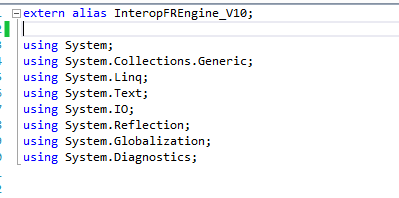
Sonra çalışan classımızın aynısından bir tane daha oluşturuyoruz. extern alias olarak ilgili dll mizi ekliyoruz.
İlgili classlara bir metod daha ekliyourz.O da şu şekilde.
RedirectAssembly("Interop.FREngine", new Version("11.1.10.100"), "2e1e7aca5d298f96"); olarak kullanabilirsiniz. Sizin projenize göre versiyon ve public key değişkenlik gösterebilir.Fakat bu şekilde hem yeni proje oluşturmaktan hem de hiçbir değişiklik yapmadan Abbyy V10 ve V11 de kullanılabilir. İyi Çalışmalar Dilerim

24 Haziran 2015 Çarşamba

.NET Türkiye Para değeri ayarlama

Dim auction_price As Double = Double.Parse(item(DAAuctions.FLD_auction_price).Text) item(DAAuctions.FLD_auction_price).Text = auction_price.ToString("#,##0")

14 Mayıs 2015 Perşembe

Chrome, Mozilla ve Explorer için 8 karakter boşluk bırakma

//Markup Kodu
  <telerik:RadEditor ID="txtRADEditor1" OnClientLoad="Editor_OnClientLoad1" runat="server" Height="100" Width="682px" ToolbarMode="ShowOnFocus" StripFormattingOptions="MSWordRemoveAll"  
                                 OnClientCommandExecuting="HTMLEditor_OnClientCommandExecuting" EnableResize="false" AutoResizeHeight="false" OnClientPasteHtml="OnClientPasteHtml">  
                                 <RealFontSizes>  
                                   <telerik:EditorRealFontSize Value="8px" />  
                                   <telerik:EditorRealFontSize Value="9px" />  
                                   <telerik:EditorRealFontSize Value="10px" />  
                                   <telerik:EditorRealFontSize Value="11px" />  
                                   <telerik:EditorRealFontSize Value="12px" />  
                                   <telerik:EditorRealFontSize Value="14px" />  
                                   <telerik:EditorRealFontSize Value="16px" />  
                                 </RealFontSizes>  
                               </telerik:RadEditor>  


//Java Script Kodu

function Editor_Tab_Press_For_Firefox(editor, args) {

    if (browser.isMozilla) {
        editor.attachEventHandler("onkeydown", function (e) {
            if (e.keyCode == '9') {
                editor.pasteHtml("&nbsp;&nbsp;&nbsp;&nbsp;");
                e.preventDefault();
                e.cancelBubble = true;
                e.stopPropagation();
            }
        });
    }
}

function Editor_OnClientLoad1(editor, args) {
    call_editor_1_justifyfull = true;

    editor.attachEventHandler("onkeydown", function (e) {
        if (e.keyCode == '9') {
            editor.pasteHtml("&nbsp;&nbsp;&nbsp;&nbsp;&nbsp;&nbsp;&nbsp;&nbsp;&nbsp;&nbsp;");
            e.preventDefault();
            e.cancelBubble = true;
            e.stopPropagation();
        }
    });

    Editor_Tab_Press_For_Firefox(editor, args);

    if (browser.isChrome) {
        editor.attachEventHandler("onkeydown", function (e) {
            if (e.keyCode == '9') {
                editor.pasteHtml("&nbsp;&nbsp;&nbsp;&nbsp;&nbsp;");
                e.preventDefault();
                e.cancelBubble = true;
                e.stopPropagation();
            }
        });
    }
}

7 Nisan 2015 Salı

Winodws Service Installer and UnInstaller

InstallUnit.exe olduğu klasör
cd C:\Windows\Microsoft.NET\Framework\v4.0.30319

Windows Servisi Kurma 
installutil  "C:\Sources\CBK\CBK.enVision\CBK.enVision.UtilityApps\enVision.DTVT.Service\enVision.DTVT.Service\bin\enVision.DTVT.Service.exe"

Windows Servisi Çalıştırma
net start "DtvtService"

Windows Servisi Kaldırma
installutil  /u "C:\Sources\CBK\CBK.enVision\CBK.enVision.UtilityApps\enVision.DTVT.Service\enVision.DTVT.Service\bin\enVision.DTVT.Service.exe"